
LinkedIn Content Repurposing Strategy
Learn how to turn your existing content — blog posts, webinars, podcasts, and newsletters — into LinkedIn carousels and graphics that reach your professional audience.
Start FreeFree to start. See plans and pricing
See what Zvario creates
Branded carousels, graphics, and posts, tailored to your message.


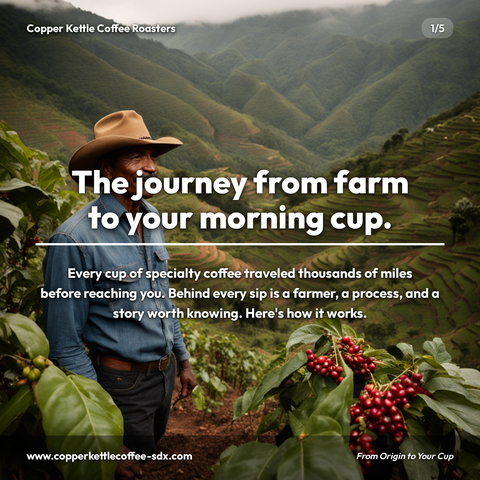





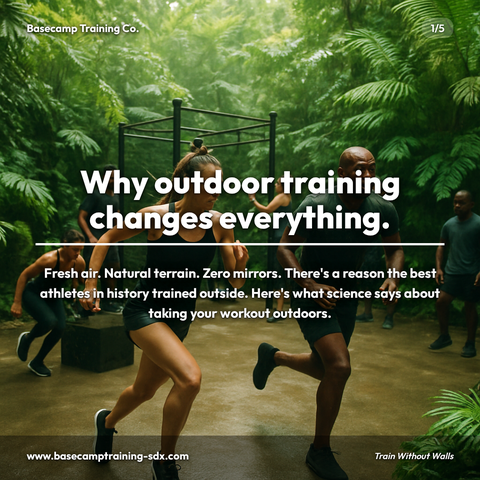
Carousels
5-slide branded PDF, ready to post on LinkedIn and social media.
Branded Graphics
Single eye-catching image with your brand colors and message.
Text Posts
Thought leadership copy, ready to paste and publish.
What is LinkedIn Content Repurposing social media content?
LinkedIn Content Repurposing refers to strategically transforming existing content assets, such as blog posts, webinars, podcasts, and newsletters, into optimized LinkedIn-native formats like carousels, infographics, and thread posts. For B2B professionals and content creators, this matters because repurposed content amplifies thought leadership, extends content ROI, and builds authority with your professional audience without requiring entirely new creative work. LinkedIn carousels keep the point moving from one slide to the next, making format conversion a critical competitive advantage. Common applications include converting technical whitepapers into 6-slide carousel decks with methodology breakdowns, transforming hour-long webinars into focused carousel series highlighting specific ROI metrics, and turning Q&A recordings into threaded posts with timestamp-indexed insights. Rather than starting from scratch, savvy marketers leverage tools like Zvario to accelerate the repurposing process, which generates optimized LinkedIn content in under 2 minutes from a single topic, enabling teams to maintain consistent posting cadences while maximizing existing content value.
Most LinkedIn content already exists — it just needs repurposing
Your best blog posts, webinar frameworks, podcast insights, and internal training materials are all LinkedIn content waiting to be formatted. Repurposing is the highest-ROI content strategy because the intellectual work is already done — the only remaining task is reformatting for the LinkedIn audience. The average professional spends 17 minutes per day on LinkedIn but consumes content from dozens of sources, meaning your existing IP has a second life waiting to be unlocked.
Why repurposed content drives higher visibility than native posts
Repurposed content performs better because it's built on proven engagement hooks and validated insights. A 2,000-word blog post that ranked for search already passed the credibility test — extracting its core insight into a carousel guarantees substance over filler. LinkedIn's algorithm rewards posts with external validation signals, and when you're repurposing established content, you're signaling to the platform that this insight matters enough to distribute across channels.
The repurposing formats that work best on LinkedIn
A 2,000-word blog post becomes a 5-slide carousel highlighting the framework and key statistics. A 60-minute webinar becomes three carousels targeting different segments plus a text post with the single most actionable insight. A podcast episode becomes a quote graphic, a key-takeaway post, and a 'what we learned' thread. The strategic principle is identifying the single highest-value insight from each source material and building your LinkedIn content around that spine rather than trying to compress everything into one post.
How repurposing builds thought leadership and credibility
Consistent, strategic content distribution positions you as an authority because you're demonstrating depth across multiple formats and platforms. When prospects see the same core insight surfaced in your carousel, your newsletter, and your text posts over weeks, they begin to recognize your perspective as a coherent POV rather than scattered thoughts. This pattern-building is how you convert LinkedIn visibility into genuine credibility — the audience recognizes you as someone who thinks deeply about your domain.
Scaling lead generation through systematic content repurposing
Repurposing creates a content multiplication effect: one 60-minute webinar yields 12+ pieces of LinkedIn content across a quarter, each with its own lead gen potential through comments, DMs, and profile visits. By building a content calendar around your existing intellectual assets, you remove the bottleneck of original creation and focus your team on distribution strategy, audience segmentation, and lead nurturing. With tools that centralize your content workflows, you can map repurposing sprints directly to sales cycles and ensure your LinkedIn presence compounds rather than fluctuates.
What you can create
- Converting technical whitepapers into 6-slide carousel decks with infographics and methodology breakdowns
- Breaking down hour-long case study webinars into individual carousel series focused on specific ROI metrics
- Transforming Q&A session recordings into LinkedIn thread posts with timestamp-indexed insights
- Repurposing product announcement emails into carousel storytelling sequences for different buyer personas
- Converting industry research reports into stat-driven carousels with critical findings and implications
- Turning long-form thought leadership essays into 7-day carousel sequences published across a week
- Extracting key frameworks from sales training videos into step-by-step carousel tutorials
- Adapting customer success case studies into before-after narrative carousels with measurable outcomes
Sample topics to get started
Frequently asked questions
Is repurposed content as effective as original LinkedIn content?
Repurposed content performs as well as or better than native LinkedIn content when the underlying insight is strong, because you're leveraging content already validated through other channels. Your LinkedIn audience hasn't consumed your blog post or watched your webinar — it's entirely new to them. The distinction between 'original' and 'repurposed' matters less than the quality of the insight itself. When you use a content management platform like Zvario, you can track performance side-by-side and prove the ROI of repurposing compared to one-off content creation.
What types of content repurpose best for LinkedIn?
Structured educational content — how-to guides, frameworks, checklists, data analyses, research findings, and case studies — repurpose particularly well because they contain discrete, extractable insights. Narrative-heavy content like personal stories and opinion pieces often need adaptation rather than direct conversion, but can still be repurposed if you isolate the core lesson or principle. The common thread is whether the source material contains a clear insight that can stand alone on LinkedIn and deliver value in 2-3 minutes of reading.
How do I know which insight to extract from a longer piece?
Identify the insight that generated the most engagement or traffic when the original content was published — blog analytics, webinar poll results, and podcast listener feedback all point to what resonated. If you don't have those signals, look for the insight that would make someone stop scrolling: the counterintuitive finding, the step-by-step process that solves a specific problem, or the data point that challenges industry assumptions. Zvario's content analysis features help you flag these moments across your existing library so you're not manually hunting through archives.
Can I repurpose the same content multiple times across different formats?
Yes, and you should — but with intentional spacing and angle variation. A single webinar can legitimately become three separate carousel series if you're targeting different buyer personas or highlighting different frameworks. The key is that each repurposed piece should feel purpose-built for its audience segment and LinkedIn format, not like a lazy re-post of the same material. Plan your repurposing calendar quarterly so you're spacing out these variations and avoiding cannibalization or audience fatigue.
How does Zvario help with the repurposing workflow?
Zvario centralizes your content sources and streamlines the reformatting process by letting you tag, organize, and adapt existing assets within a single platform. Rather than manually exporting blog posts or hunting through webinar libraries, you can build repurposing templates that auto-pull insights and format them for LinkedIn's carousel, text post, and document specs. You can also track which repurposed pieces drive engagement and link performance back to the original source, creating a feedback loop that shows which of your intellectual assets have the highest LinkedIn ROI.
What is the fastest way to create content on this topic?
Enter the topic and Zvario returns a finished, branded carousel, graphic, or post in about a minute. You review, adjust wording if you want, and publish.
Is there a free way to try it?
Yes. Zvario gives you 5 free creations with no credit card. Ongoing use is $19.95 a month on Starter for up to 80 creations a week, or $39.99 a month on Pro for up to 130 plus one-click posting.
Explore More
Repurpose your content into LinkedIn carousels in minutes
Try it free — no credit card needed.
Start FreeFree to start. See plans and pricing